ADVERTISING DISPLAY · ENGLISH BUYER GUIDE
Buy an advertising-screen charger with a content handover plan
By Xiaochong Energy · · 6 min read
An advertising screen adds another operational handover to a commercial charging project. Who supplies the first playlist, who may change it, and what happens when content is missing? Resolve those questions before comparing equipment quotations. A visible screen is not evidence that every media feature, licence or ongoing service is included.
This original procurement checklist is not electrical, cybersecurity, accessibility, advertising-law or installation approval. Final electrical, protection, civil, accessibility, payment, cybersecurity, certification and local-compliance decisions require qualified local review and exact-model documentation. No advertising income or audience measurement is promised.
1. Separate three scopes in the quotation
Identify the advertising display, the charging user interface and any payment/control integration separately. Ask the supplier to mark which components and functions are included, optional or not offered. Do not assume that the ability to play an image means a media account can alter charging settings, accept payments or access charging-session records.
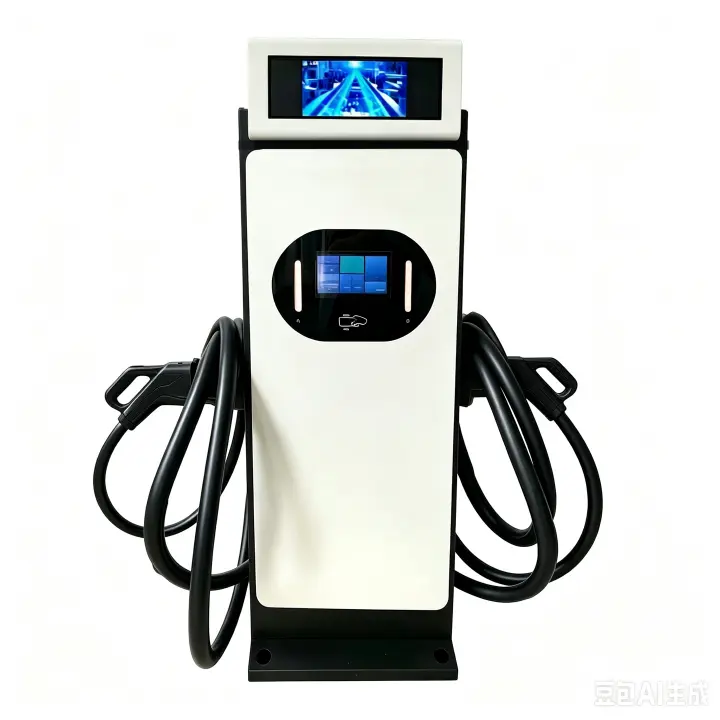
The live DC-120-AD-W product page identifies a 120 kW dual-gun DC charger with an advertising screen. It does not commit to a particular content management system or advertising revenue. Use that verified product track as the starting point, then obtain the ordered configuration and media scope in writing.
Put commercial omissions beside technical ones: player licence, hosting or connectivity, content preparation, account setup, update support and renewal terms. “Screen included” should not quietly become “all future media services included.”
2. Create a media-scope register, not a guessed specification
These are questions to resolve with the supplier, not claimed Xiaochong features or universal acceptance limits.
| Field | Evidence to request |
|---|---|
| Ordered equipment | Exact charger, display and player identification; relevant hardware/software revision; distinction between advertising screen and charging HMI. |
| Accepted media | Confirmed file types, size/orientation limits, playback behaviour and an approved sample file. Do not infer specifications from a catalogue photograph. |
| Update method | Documented local or remote workflow, if offered; required connection, responsible account owner and supported acknowledgement or failure indication. |
| Scheduling and fallback | If scheduling is offered, its time source and behaviour after restart. Agree what is displayed without a valid playlist or connection; demonstrate only supported functions. |
| Permissions and records | Who may approve, upload, publish or remove content; which actions can be recorded; separation from charger and payment administration. |
| Ongoing responsibility | Who maintains media software, content, display and connectivity; what is included in support, and how optional licences or services are charged. |
A useful tender row has an answer, evidence reference, revision and owner. Keep “not confirmed” visible until it is resolved. Record a project-specific change when a player, display or integration is substituted; the old demonstration may no longer represent the delivered arrangement.
3. Keep advertising out of the charging decision path
Ask the interface owner to demonstrate how the agreed charging information remains available while media is playing. Review the actual ordered interface, not an advertising mock-up. Coordinate with the screen-language acceptance checklist for the charging prompts and language scope.
W3C's informative explanation of Pause, Stop, Hide discusses how moving or updating web content can distract from parallel tasks and describes user controls. This is a useful review prompt, not proof that a charger is WCAG-certified or that this web-content explanation is a worldwide hardware requirement. Have the responsible specialist decide what applies to the actual interface and location.
Do not invent brightness, resolution, viewing-angle or control features. Ask for model-specific documentation and a demonstration suited to the project's use conditions. Agree who reviews unresolved interface issues before sign-off.
4. Use an owner-approved sample for a bounded demonstration
For an illustrative retail-site pilot, the owner supplies a still image and a short video for which it has permission, if those formats are confirmed. The parties agree which authorised person publishes them and which display shows them. This is an invented planning example, not a customer reference.
Build the demonstration record around the supported workflow: identify the unit and versions; retain sample-file references; record the approved content, observed playback and authorised removal process. Where explicitly supported and safely scoped, review missing-content, lost-connection, restart and update-failure behaviour. Unsupported functions become open procurement questions, not automatic test failures or promises.
Any charging-state demonstration belongs in the manufacturer's agreed safe test procedure with qualified personnel. Do not improvise live electrical tests or alter protection, wiring, network security or payment settings for a media trial. Link the record to the factory/site acceptance package, with media deliverables clearly separated.
5. Hand over ownership and support without sharing secrets
Name the content approver and media administrator, the charger operator, the connectivity owner and the support contact. Agree account transfer or access revocation when an agency or staff member changes. Reference the cybersecurity procurement checklist for the wider project review; a media account must not be treated as a shortcut to charger administration.
Public handover summaries should contain document identifiers and responsibility assignments, not passwords, tokens, private schematics or proprietary software. Exchange authorised access through the agreed secure process. Confirm content rights and applicable local requirements with the owner's competent advisers.
If playback records exist, define what each event means and what it omits. A “played” event is not an audited count of people who saw the screen, an advertiser contract or a revenue forecast. Keep screen maintenance, content work and charger repair labour separately scoped.
6. Keep AC and DC SKD cooperation tracks explicit
AC EV charger SKD kits and technical documentation: request the selected AC model, component/BOM scope, local assembly responsibilities and document revisions. Do not assume that an AC kit includes an advertising display or inherits the media functions of a DC product.
DC EV charger SKD kits and technical documentation: agree the selected DC model, modules/cabinet and control scope, and any separately confirmed advertising-screen components or integration. Assign final-unit assembly, test and service responsibilities before ordering.
Xiaochong recruits overseas businesses interested in local charger production/assembly, SKD components, production/assembly technical support and repair/maintenance technical support. Available AC or DC technical documents are free on request. Hardware, unrestricted source code, all intellectual property, certification, training, repair labour, exclusive territory rights and every project deliverable are not automatically free. Exact models, components, document revisions, licensing and training/testing/support scope must be agreed for the project. Only owner-approved, verified documents may be shared publicly.
Buyer questions
Does an advertising screen include a particular content management system?
Not automatically. Confirm the ordered display and player, supported media, update method, access rights, network dependencies and any software or service fees in the project scope.
Can playback logs establish advertising revenue or audience size?
No. A playback record, if supported, describes the agreed player event. It is not an audited audience count, an advertising contract or a revenue guarantee.
Are all media software and handover services free with the technical documents?
No. Available AC or DC technical documents are free on request. Hardware, software rights, content production, training, testing and support deliverables require their own project-specific agreement.
Primary sources reviewed 9 October 2026: the live Xiaochong advertising-screen product page and W3C's informative web-content guidance. The scope register and pilot example are original procurement guidance. No private technical file is reproduced.
Request the correct product track and free technical documents
Send your company, country, AC or DC track, proposed model, quantity, media use case and the unanswered fields in your register. Request free available AC or DC technical documents; ask separately for any additional media integration, test, training or support deliverable.
Use the official partner programme, AC/DC SKD technical-output page, applicable advertising-screen DC product and procurement guide. The free RFQ brief builder can organise your request; it is not electrical, cybersecurity, advertising, payment-network or regulatory approval.
xc0225888@163.com · Sales 1: +86 137 1772 6888 · Sales 2: +86 134 2580 6997