
INSTALLATION DOCUMENTS · ENGLISH BUYER GUIDE
Release the drawing package before releasing charger civil works
By Xiaochong Energy · · 6 min read
A charger can fit on a parking plan while its mounting pattern, incoming cable route or maintenance access remains unresolved. For a fleet depot, commercial car park or distributed rollout, treat the installation drawing package as a procurement deliverable with its own release gate. A catalogue picture and an equipment purchase order are not that package.
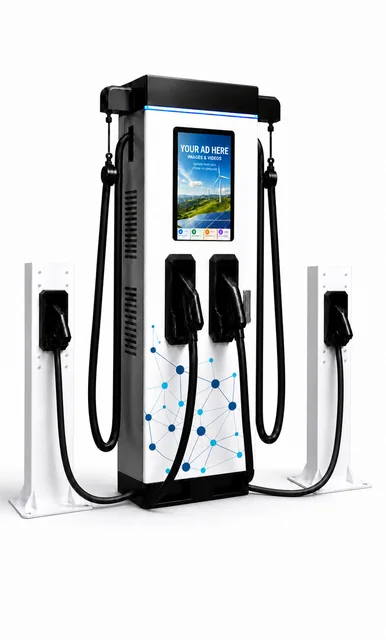
This guide proposes document and responsibility checks, not an installation design. It supplies no foundation dimensions, anchor specification, conductor size or electrical approval. Qualified local designers and installers must resolve structural, electrical, drainage, accessibility, impact-protection and other applicable requirements using exact-model documentation and site evidence.
1. Buy an identified document package, not a promise of “drawings later”
Before the civil contractor commits to irreversible work, identify the ordered model and variant, mounting option, cable-management arrangement and supplied accessories. Ask which documents will be provided, in what format and language, by whom, and by what agreed review date. Keep missing information visible as an open issue rather than filling the gap from a similar-looking product.
As a primary-source example of document scope, ABB's Terra DC Wallbox installation manual separately addresses placement and maintenance space, ventilation, mounting preparations and cable entry. This illustrates why external cabinet dimensions alone are incomplete. Its requirements apply to the identified ABB product, not to Xiaochong equipment.
For Xiaochong, request the applicable model-specific package through the commercial procurement guide. Confirm the deliverables and review responsibilities in writing; this article does not promise that every proposed document or engineering service is included in every quotation.
2. Keep five physical interfaces visible
Use a document register that names the drawing or specification supporting each interface. The following is a proposed review matrix, not a substitute for the manufacturer's instructions or the site's design.
| Interface | Evidence to request and reconcile |
|---|---|
| Equipment to mounting surface | Model-specific mounting pattern and reference points, supported mounting option, equipment data needed by the designer, and the approved site foundation or support design. |
| Site cables to equipment | Documented entry positions and connection-space requirements, coordinated with the site cable route and the qualified designer's selected cable system. |
| Cabinet to surrounding space | Body outline distinguished from documented door-opening, ventilation, inspection and maintenance access requirements. |
| Charging cable to vehicle and users | Confirmed cable arrangement and intended vehicle positions, reviewed alongside pedestrian routes, accessibility and site circulation. |
| Accessories to the whole installation | Separate interfaces for a pedestal, cable support, kiosk or protective feature where selected; identify who supplies and approves each item. |
Ask the document owner to clarify units, orientation and reference level. A hole location measured from a cabinet edge is not automatically the same coordinate used by the civil drawing. Do not scale a marketing photograph or infer an unmarked dimension from a PDF screenshot.
3. Assign the supplier/site-design boundary
The equipment supplier and the site designer answer different questions. Record who supplies product interface information and who converts it into the approved site design. Name the party responsible for surveying existing conditions and reconciling equipment data with the actual location. Do not treat an equipment drawing as approval of the ground, wall, slab, utility capacity or installation method.
Ask the civil and electrical reviewers to return a coordinated response. If an entry location conflicts with the planned route, leave that interface open until the responsible parties agree a documented solution. A commercial delivery deadline does not settle a technical conflict.
For constrained sites, the space-limited installation guide discusses the wider planning envelope. This checklist addresses the next handover: which exact documents make the selected equipment and the site's construction package consistent.
4. Define what each release status permits
Agree the meaning of document statuses before using them. Your project might distinguish quotation information, design-review information and an approved construction issue. Those labels only help if the recipients understand what work is permitted and who can authorise the next stage.
- Before equipment selection: record provisional assumptions, excluded accessories and the questions that could change the layout.
- Before construction release: reconcile the approved equipment interfaces with the site's drawings. Name the release authority and list any work that must remain on hold.
- Before delivery and installation: confirm that the shipped configuration matches the released package, or route any difference through the agreed change process.
- At handover: retain the accepted installed record and approved deviations, with accessible document references for operations and maintenance.
The buyer's register can contain model/variant, document number, revision, issue date, status, applicable location, reviewer, unresolved interface and release decision. This is a compact coordination record, not a requirement to publish private schematics. Share controlled information only with authorised project participants.
5. Test the process with a fictional clash
Imagine that a site's preliminary plan assumes incoming cables enter from one side, while the selected configuration's later document shows a different interface. The site team has not yet started the affected civil work. This is an illustrative scenario, not a Xiaochong defect or customer case.
First identify which site positions and documents are affected. Obtain the correct model-specific information and let the responsible designers assess the conflict. Record the agreed solution, any quotation or schedule consequences, and who approves the revised issue. Distribute the released package to the people actually executing the work and withdraw the superseded issue from their working set.
Do not improvise an equipment modification, change an entry arrangement or reuse a foundation merely because it appears close enough. The configuration-change guide covers approval of product substitutions; this document gate prevents unresolved physical interfaces from silently reaching construction.
6. Separate AC and DC SKD document responsibilities
AC EV charger SKD kits and technical documentation: agree the AC model, supplied components and assembly-document revisions. If the local partner provides an enclosure, pedestal or other installation interface, identify who supplies its drawings and who verifies the final assembled configuration before those interfaces are released to a site.
DC EV charger SKD kits and technical documentation: agree the DC configuration, cabinet and component scope, integration documents and responsibility for installation, testing and maintenance information. Do not assume that documents for a supplied subsystem cover every interface of the locally completed charger.
Xiaochong recruits overseas businesses interested in local charger production or assembly, SKD components, production/assembly technical support and repair/maintenance technical support. Available AC or DC technical documentation is free on request. Hardware, unrestricted source code, all intellectual property, certification, training, repair labour and exclusive territory rights are not automatically free. Exact models, components, document revisions, language, licensing and testing/support deliverables must be agreed for the project.
Buyer questions
Can a catalogue cabinet size be used to order the foundation?
No. Request the selected model's installation interfaces and have the responsible qualified site designer review the foundation, mounting, cable routes and surrounding space before construction release.
Does a drawing marked for quotation authorise construction?
No. Agree what each document status permits. The project needs an explicitly approved construction package, with unresolved interfaces and the release authority identified.
Are AC and DC SKD installation documents interchangeable?
No. The supplied kits, locally completed enclosure or mounting arrangement, and final assembled configuration can differ. Agree the applicable AC or DC documentation and who verifies the finished unit's installation interfaces.
Primary source reviewed 5 October 2026: ABB Terra DC Wallbox installation manual, sections 2.2, 5.2 and 5.4. The interface matrix and fictional clash are original procurement guidance. No ABB dimensions, component requirements or approvals are transferred to Xiaochong.
Request the AC or DC installation-document scope
Send your country, company, AC or DC track, intended model, mounting arrangement, site plan and local assembly or installation capability. Request free available AC or DC technical documents and confirmation of the applicable drawing package, delivery dates and review responsibilities. Only owner-approved material may be shared.
Review the official partner programme and AC/DC SKD technical-output scope. The RFQ brief builder helps organise a request. The cable-reach tool provides a preliminary geometric screen only; neither tool approves construction, electrical design, accessibility or local compliance.
xc0225888@163.com · Sales 1: +86 137 1772 6888 · Sales 2: +86 134 2580 6997